How to Use Excel Text Manipulation Formulas with Fantasy Baseball Data

In our last post we took a close look at a handful of different web query options available in Microsoft Excel.

By the end of that post we had an Excel file that was able to automatically go out and pull in a raw listing of player names and salaries. All you had to do was figure out the ID for the slate of games you’re entering on FanDuel and type in that five digit number.

FanDuelContestID

Then voila… Current salary information (or you can even run it for tomorrow to start planning the night before)!
FanDuel_Salaries

The Next Step

So now we have player names and salaries. And we know from doing research at how to succeed playing DFS that we also need to bring in other information like batting and pitching splits, Vegas over/unders, and weather data.

We also know that using Player IDs is a more reliable way of matching players up with all of this data.

New Column On The Player ID Map

To bring all this data together, I recognized that we need a way to match a player’s name according to FanDuel to the player ID systems shown on the Player ID Map. So I made an update to the map over the weekend and added “FANDUELNAME” in column AF (I also added over 30 new players that have been called up during this season and/or are starting to have a “fantasy impact”. Guys like Carson Smith, Nate Karns, Carlos Frias, Lance McCullers).
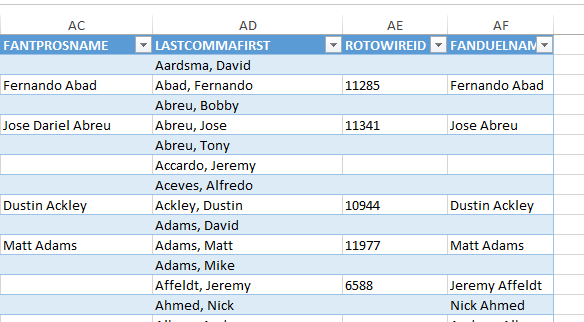
FanDuelName

If you’re using the Player ID Map and you want instructions on how to drop in an updated version, check this out.

But We Had a Problem

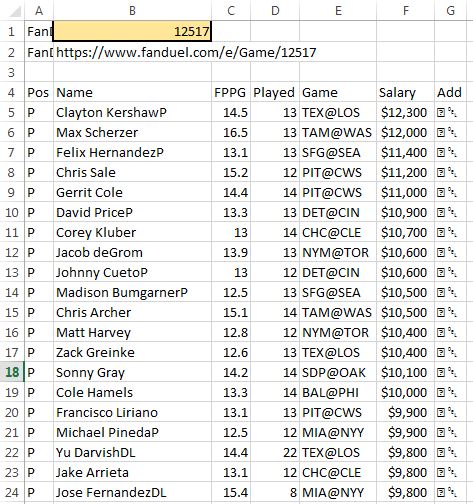
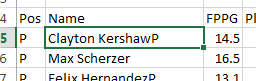
Look closely at the image below.ClaytonKershawFanDuel

Who the heck is “Clayton KershawP”?

If you look through the list a little more you will see “Jose FernandezDL”, “Yordano VenturaDTD”, and “Ervin SantanaNA”.

You can probably see that some player names are reflecting health or availability information. This is great, but it poses a challenge for our ability to match to the new column in the Player ID Map. Kershaw is going to be listed as “Clayton Kershaw” on the list. Not “KershawP”.

Enter Excel Formulas “RIGHT”, “LEFT”, “FIND”, “LEN”, and “IF”

We are going to use a series of formulas to do the following things:

  1. Identify if a player name has “DL”, “DTD”, “NA”, or “P”. I’ve scanned the list of player names and those are the only injury/availability classifications I see.
  2. If a player has one of those health indicators on their name we will strip it off
  3. If a player does not have health indicators, we’ll just use their name as it is shown

RIGHT

The RIGHT function will give you the rightmost characters in a text string. For example, we could use the RIGHT function to look at the string “Yu DarvishDL” to determine if the two rightmost characters are “DL”.

This formula uses two inputs:

  1. Text – The main string of text you want to pull the rightmost characters from (this can be a cell reference)
  2. Num_chars – The number of characters to pull out
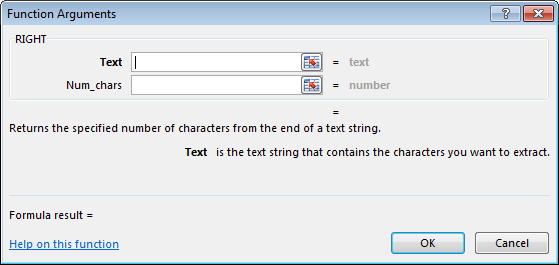
RIGHT_FORMULA

We will use the RIGHT function to look at only the last three characters of each player’s name. We only need the last three because our longest health indicator is “DTD” (three characters in length). And we don’t want to look at full names, because one of our health indicators is just “P”. We can’t just tell Excel to look for a capital P in an entire player name because player’s like Michael Pineda or David Price might cause us trouble. So by limiting our search to just the last three letters in a player name, we should be able to located “DL”, “DTD”, “NA”, and “P” without issue.

FIND

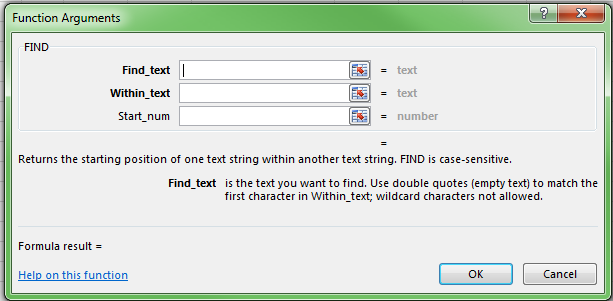
The FIND function searches for a specific string of text within another string of text. If the string you are searching for is located, it returns a number that indicates the location where the string starts. FIND is also case-sensitive (thank goodness, otherwise looking for “NA” at the end of player names could be a problem with guys named “Santana”).

This formula requires two inputs and has one optional input:

  1. Find_text – The string of text you are searching for. You can enter your text in double quotes or use a cell reference.
  2. Within_text – The string of text you want to search within. This can be a cell reference.
  3. Start_num (optional) – What character within the string you want to start searching at. For example, if you wanted to start by searching only after the fifth character in a name, you could enter a five for this argument.
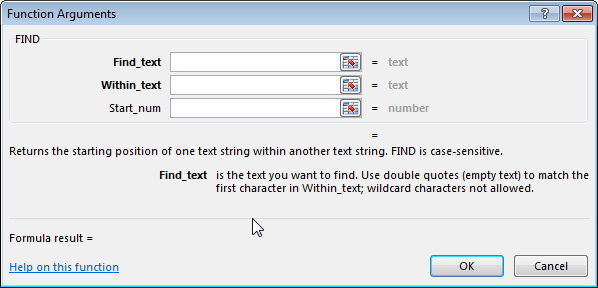
FIND_FORMULA

We will use the FIND function in conjunction with the RIGHT formula mentioned above. We will use RIGHT to first pull out only the last three characters from a player’s name. We will then run a FIND on those three characters to look for “P”, “DTD”, “DL”, or “N/A”.

LEFT

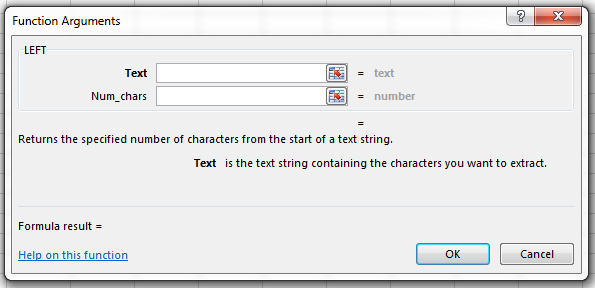
Similar to the RIGHT function, LEFT will give you the leftmost characters in a text string.

This formula uses two inputs:

  1. Text – The main string of text you want to pull the leftmost characters from (this can be a cell reference)
  2. Num_chars – The number of characters to pull out
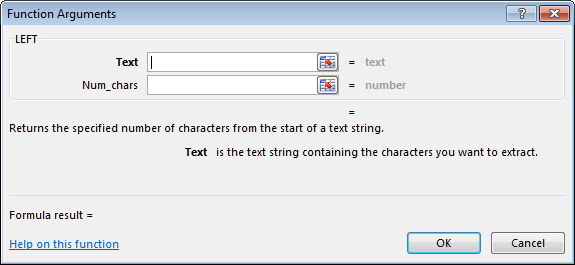
LEFT_FORMULA

We will use LEFT on players that have health information in their name. For example, for “Clayton KershawP”, we will want to pull out the first 15 characters (out of the total 16 characters in the full string of text).

LEN

The LEN function will tell you the number of characters in a string of text.

This formula has just one input, Text, which represents the text to want to count the characters from. This can be a cell reference.
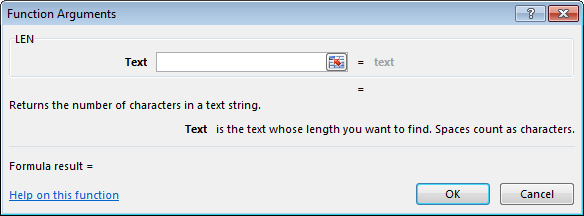
LEN_FORMULA

We will use LEN with the LEFT function mentioned above. Remember the “Clayton KershawP” example where I mentioned that string of text has 16 characters and we want to take the leftmost 15 characters? We will use LEN to easily get that 16. We’ll use LEN to evaluate how many characters are in every player’s name.

IF

The IF function allows you to evaluate a cell to see if a condition is true or false. If the condition is true, we can give one result or a specific formula. If the condition is false, we can give a second result or an alternative formula.

This formula uses three inputs:

  1. Logical_test – The condition you want to evaluate for being true or false.
  2. Value_if_true – The value or formula you want to run if the Logical_test is true.
  3. Value_if_false – The value or formula you want to run if the Logical_test is false.
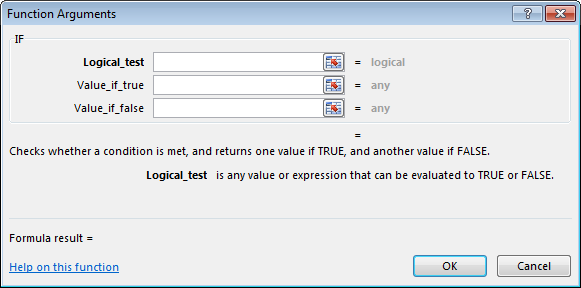
IF_FORMULA

Nesting Formulas

By default, the IF function only allows you two options. One if true. One if false.

This might be a problem for us. Here are some of the tests we need to run…

If we find “P” in the last three characters of the player name, cut off the last character from the name (or if the player’s name is 16 characters in length, give me the leftmost 15). If we find a “DL” in the last three characters of the player name, cut off the last two characters from the name (or give me the leftmost 14 from a 16 character name). If we find a “DTD” in the last three characters, cut off those three letters from the name (or give me the leftmost 13 from a 16 character name). If we find an “NA”, cut off the last two characters (14 from 16). And if none of those are true, then just give me the full length of the player’s name and remove nothing.

Thankfully you can also “nest” IF functions to give you more options. In a weird combination of Excel language and plain English, our formula will look something like this:

=IF(player is status "P", give me LEFT(player_name, LEN(player_name)-1), if their status is not "P" then IF(player status is "DL", give me LEFT(player_name, LEN(player_name)-2),if their status is not "DL" then IF(player status is "DTD", give me LEFT(player_name, LEN(player_name)-3, if their status is not "DL" then IF(player is "NA", give me LEFT(player_name, LEN(player_name)-2), if their status is not "NA" just give me player_name))))

This is basically saying, if a player is marked as “P”, cut off one character from their name (that’s what the “-1” is doing in the LEFT(player_name, LEN(player_name)-1). If the player is not marked as “P”, go to the next IF statement. If the player is marked as “DL”, cut off two characters from their name LEFT(player_name, LEN(player_name)-2). If the player is not marked as “DL, go to the next IF statement.

And so on. Until we get to the very end of all the IF statements. The final player_name just indicates that if all the previous IF conditions are false, this is what will show.

One More Web Query Option I Didn’t Mention

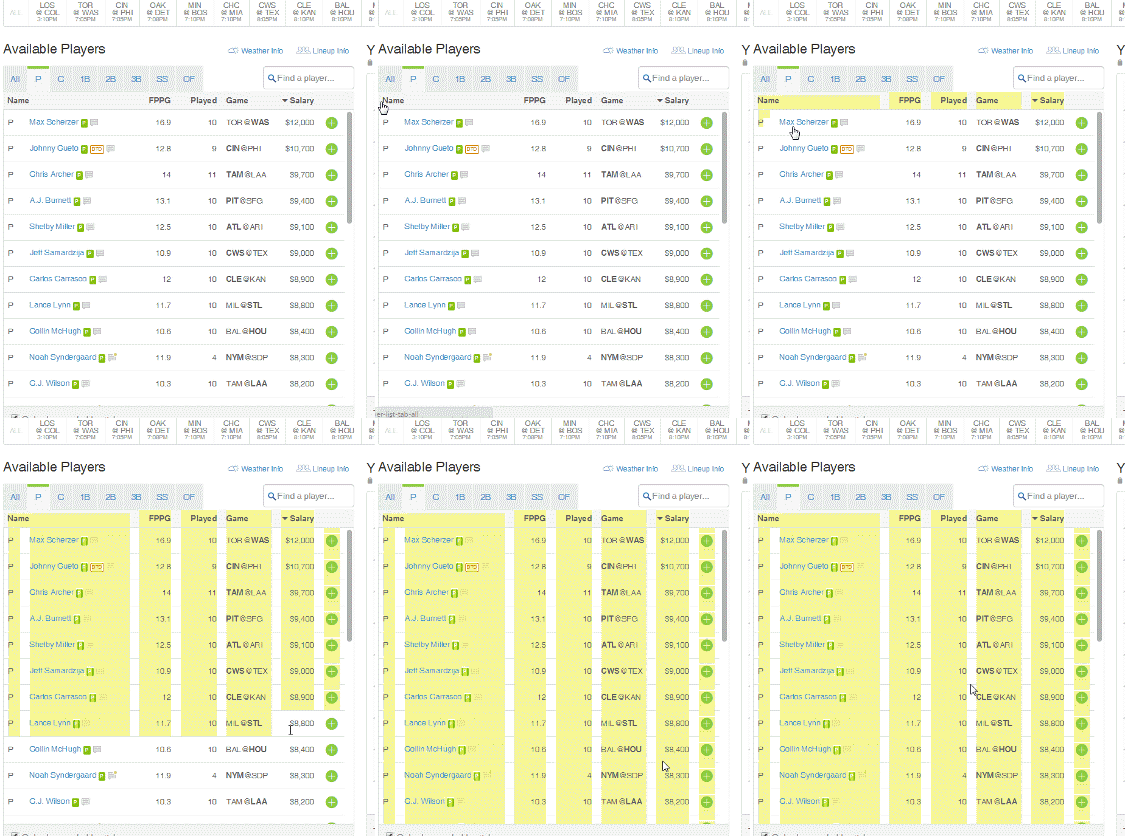
We looked at quite a few web query options in the last post, but I neglected to mention one that will now be helpful to use. We are going to be placing the formulas from above next to the FanDuel web query results (you can see my vision of how this will look below, they’re shaded a yellowish color).

FormulasNextToData

The potential problem with doing this is that the web query results and FanDuel’s list of player names will be changing each day and for each contest. The length of the player list is going to be a lot longer for a full slate of games on a Wednesday night than it will be for the afternoon slate on a Thursday.

Fortunately, Excel offers a setting that will attempt to fill the formulas down as far as the data in the web query reaches. To activate this setting, first select a cell in the middle of the web query results (for example, select the cell with Clayton Kerhsaw’s name).
Clayton_Kershaw_FanDuel

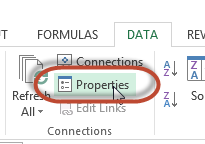
Then click on the “Data” tab. And then click the “Properties” button in the “Connection” section of the Data tab.
Data_Connection_Properties

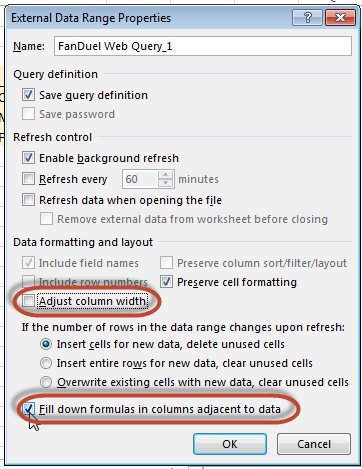
This will bring up the “External Data Range Properties” dialog. Check the bottom check box for “Fill down formulas in columns adjacent to data”. This will attempt to fill our formulas to the exact size of the web query results. I also like to uncheck the “Adjust column width” box because each time the web query runs, it resizes my columns and I find it annoying.
External_Data_Range_Properties

Step-By-Step Instructions

If you want to make sure you’re at the same starting point as me, here’s an Excel file Continue reading “How to Use Excel Text Manipulation Formulas with Fantasy Baseball Data”
How to Use Excel to Web Query DFS and Other Fantasy Baseball Data

NOTE: It appears the information below is no longer relevant. You are welcome to read the article because it still contains a valuable approach that can be used in other scenarios. But the specific act of web querying FanDuel for salary information as shown below no longer seems to work.

With a web query there will be no more manual copying and pasting of data.
With a web query there will be no more manual copy and pasting of data.
Does this sound familiar?

You’re doing prep work for setting a daily lineup or even preparing for a season-long rotiserrie league. You’re trying to set up a spreadsheet to help you prepare, but you are sick and tired of having to copy information from the web and paste it into Excel.

There has to be a better way!

In this post I’ll show you an efficient way of grabbing player salaries directly from FanDuel’s website using Excel’s web query function. In fact, I’ll show you three different variations of Excel web queries:

  1. Simple web query
  2. Dynamic web query
  3. Table-specific web query

Before I begin, I need to be honest with you about something.

I Don’t Know Where We’re Going

This is the first post of what I hope will be a series documenting how to build a spreadsheet for DFS. But the thing is, I don’t know exactly where I’m headed on this journey. I can’t promise you a panacea to cure all your DFS aches and pains. I don’t have a master plan that will lead us to a perfect functioning spreadsheet that will fit everyone’s exact desires. But my plan is to just start moving the ball in the right direction.

I don’t have much DFS experience. I don’t know exactly what you want. If you are looking for DFS lineup advice, I can tell you I won’t be giving that. But what I do have are a very particular set of skills. Skills I have acquired over a very long career… OK, I’ll end my Liam Neeson joke.

I hope that by just starting to build something, starting to share techniques you can use on your own, and by seeking feedback, we will eventually end up with something special.

Some of the techniques I’ll show you may seem silly. Or pointless. Or way too involved.

But I have a purpose in mind. You might wonder why I pull data from Site Y when Site X has the same information in an easier to use format. Or you may want to incorporate additional data that I don’t want to pursue.

That is why I want to stress it is not the “WHAT” in the instructions that is the important part. It is the “HOW”. I’m going for that whole “teach a man to fish” proverb. So let’s start learning…

Not All Versions of Excel are Created Equal

I’ll be using Office 2013 installed on a Windows 7 machine. I believe the web querying experience will be similar for Office 2007 and Office 2010 (while using Windows). Unfortunately, I have had poor results with web querying in Excel for Mac, but it can be done.

What Is a Web Query?

A web query is an automated way to copy information from a table on a web page into Excel. It removes the need for you to manually copy and paste data from websites into Excel. On top of that, you can set the query up to run each time you open an Excel file or change a particular value, so you can escape the cycle of continuously needing to go to a web site, copy the data, and paste it into Excel each day you want to set lineups. It can refresh automatically!

As you’ll soon see, setting up a basic web query is fairly easy. But there are a couple of more advanced settings that should make your life a little bit easier.

Step-By-Step Instructions, Simple Web Query

For this example, let’s just go with a simple and straight-forward web query. Later in this post we will build on this.

Continue reading “How to Use Excel to Web Query DFS and Other Fantasy Baseball Data”

How Do You DFS?

Nobody should go it alone.

At the end of my last post, “Maybe I’m Wrong About BvP“, I mentioned an online survey was forthcoming… And here it is.

I say nobody should go it alone because my hope with this survey is to use the SFBB community to identify the best DFS tools out there, what types of information people want to see, and what sites are currently providing that information. Once we have that information, we can start figuring out the best way to bring it all together.

Please take the time to complete this survey, especially if you are using specific websites, tools, or resources to develop and set your daily lineups.

The survey should load right below, or you can go here to contribute.

Create your own user feedback survey

How To Get Started With Daily Fantasy Baseball – Part 4 – Maybe I’m Wrong About BvP

I’m a little embarrassed about this. One of the reasons I started this site is because it aggravates me when people over-simplify things or fail to do proper analysis before making claims.

And I just did this myself.

What I Did Wrong

To fully understand where I went wrong, you should probably read Part 2 in my series documenting my DFS journey, “The Book and Addressing the Myths“.

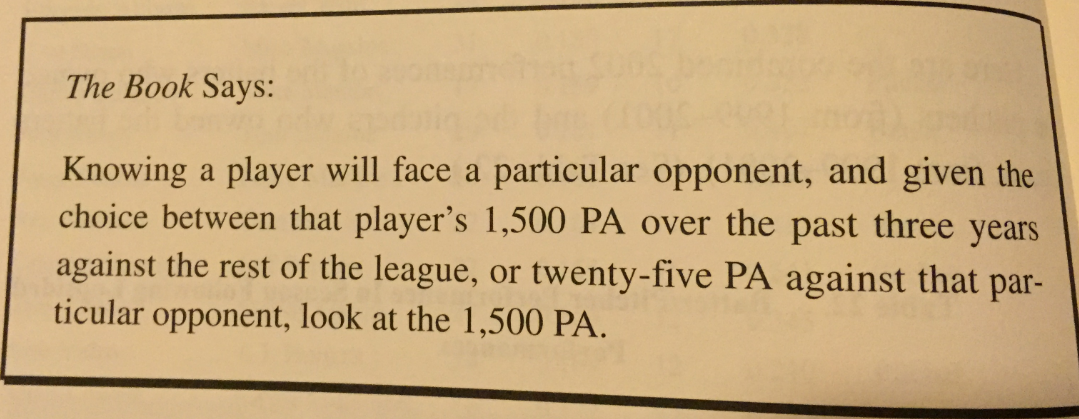
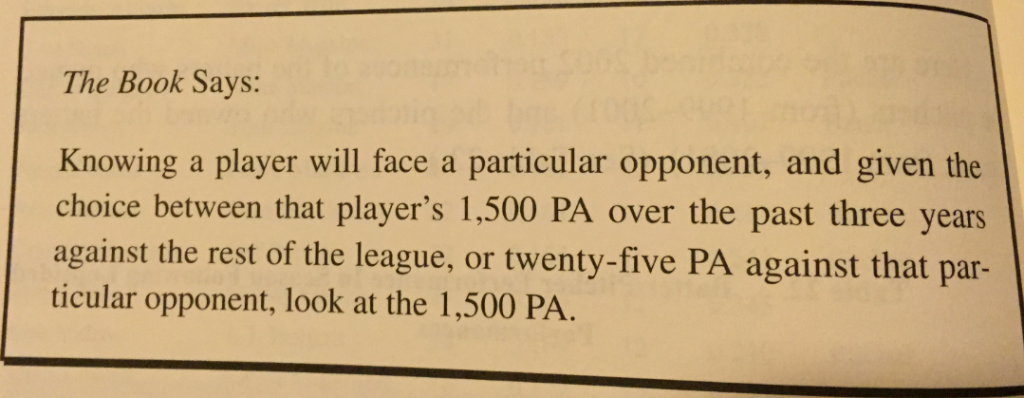
I read The Book. And it’s clear. It’s right there in black and white for all to see. Don’t use BvP to make decisions.

An excerpt from "The Book", by Tom Tango, Mitchel Lichtman, and Andrew Dolphin
An excerpt from “The Book”, by Tom Tango, Mitchel Lichtman, and Andrew Dolphin

So what’s the problem?

It might help if we first take a step back. When we’re analyzing a particular baseball statistic (pick one), we often find that they’re not predictive from one year to the next. Take batting average for instance. We know that just because a batter hit .300 last year, it’s not a safe bet to count on that repeating itself.

What do we do in this case? We disaggregate the data. We break it down into other component statistics that we can much more reliably project. Instead of looking only at batting average, we’ll start to look at strikeout rate, walk rate, batted ball profiles, historical BABIP, and more.

I Should Have Done This with Batter-Vs-Pitcher Stats

I should have thought to disagreggate things. After all, just like I get along well with certain people and others make me want to drink bleach, some hitters are going to “have an edge” on certain pitchers and they’re going to be overmatched by others.

Not all pitchers are created equal. Not all hitters are created equal.

Whether it’s a batter’s swing path, a pitcher’s arm slot, a batter’s ability to go the other way, a pitcher’s level of deception, a batter’s inability to hit the down-and-in pitch, or a pitcher’s proclivity to throw a changeup in two-strike counts, there are many variables at play in a BvP matchup.

And it is VERY likely that these variables give an edge to the pitcher or the hitter. It’s VERY possible that one of these variables could put the odds overwhelmingly in one party’s favor. It’s also VERY possible that for every factor giving an edge to the hitter that there is an equal and offsetting factor giving an advantage to the pitcher.

It’s not that BvP is useless. It’s not that it has no predictive value. Certain hitters have an edge over specific pitchers. And vice versa. Of course they do. It just makes sense.

The problem is that we don’t know how to separate out the BvP matchups that are predictive those that don’t. Due to small sample sizes, when you go to break it down, BvP matchups probably fall into these nine buckets:

Bucket Description
1. Hitters with an edge over a pitcher, exceeding the expectations due to good luck
2. Hitters with an edge over a pitcher, performing right at expectations due to neutral luck
3. Hitters with an edge over a pitcher, underperforming the expectations due to bad luck
4. Hitter with a neutral matchup against a pitcher, exceeding the expectations due to good luck
5. Hitters with a neutral matchup against a pitcher, performing right at expectations due to neutral luck
6. Hitters with a neutral matchup against a pitcher, underperforming the expectations due to bad luck
7. Hitters overmatched by a pitcher, exceeding the expectations due to good luck
8. Hitters overmatched by a pitcher, performing right at expectations due to neutral luck
9. Hitters overmatched by a pitcher, underperforming the expectations due to bad luck

And just like when you combine a bunch of bright colors of Play Doh into one and end up with brown; when you combine all of these different buckets into one, you end up thinking that batter versus pitcher matchups don’t matter.

How This Came To My Attention

It was an interview with Todd Zola, by Patrick Davitt on the Baseball HQ podcst, and this article at Fantasy Alarm.com that helped me realize the err of my ways.

Continue reading “How To Get Started With Daily Fantasy Baseball – Part 4 – Maybe I’m Wrong About BvP”

How To Get Started With Daily Fantasy Baseball – Part 3 – Game Theory and Optimizing Your Chances of Winning

Welcome to the third part in my series documenting my journey of getting started with daily fantasy baseball. In the first segment, I did some introductory background reading. In the second segment, I took a look at some common statistics that you might be inclined to look at but that have been proven to be misleading (Batter versus Pitcher stats and players in the midst of hot or cold streaks).

More Background Reading

While I was doing my initial background research for Part 1 of this series, I also bought Jonathan Bales’ book “Fantasy Baseball for Smart People”.

The book is a tremendous resource if you’re like me and just getting started. I presume it’s also quite helpful even if you’ve been playing the daily game for a while.

If I’m being honest, you will save yourself a lot of time by buying his book instead of waiting for me to slowly process my own way through DFS and writing about it. Once you read Bales’ book, then come back to me to see how to implement the topics covered in an Excel solution. Bales has created an excellent beginner’s guide to daily fantasy baseball by giving you strategies, tools, websites, and outlining the exact information you should be looking at when generating lineups.

One topic I’ve seen mentioned in the book and repeated many times online is that to be successful at DFS you need to play the game regularly (“grind”) and as such you need to develop an efficient routine that allows you to create quality optimized lineups regularly. My hope is to use Excel (and maybe other technology tools) to do this.

My “Aha Moment”

There are two significant benefits I got from “Fantasy Baseball For Smart People”. The first is that it’s a convenient and complete package. You could probably get nearly all of the information from the book by reading through the various articles I linked to in Part 1 of this series. If you go that route you even get the information for free. But this book will save you time and puts them in a nice easy-to-use and convenient package.

As much as I love technology, I’m still a “book-in-hand” kind of guy. So I bought the paperback, which lets me dog ear pages I want to remember and reference easily in the future. There’s no easy way to do that with the 20-30 articles I linked to in Part 1.

The second big benefit I get from the book is an insight I did not see anywhere else in my prior readings.

The goal isn’t to maximize points (in your lineup), but to maximize win probability.

~ Jonathan Bales – Fantasy Baseball for Smart People

Maybe this is obvious to everyone, but it wasn’t to me. It’s a significant difference between season-long leagues and DFS.

I can’t envision a scenario in a season-long rotisserie league that you would not want to maximize your projected points in the standings. It’s a simple concept that having the most points in the standings gives you the greatest likelihood of winning the league.

But there’s an interesting wrinkle that I alluded to in Part 1 that changes things in DFS. Player selection is not mutually exclusive. I know, I know. There I go again using math words. This is a fancy way of saying that the players you choose for your team can (and inevitably will) overlap with players chosen for other teams.

Bales’ point can be illustrated by a simple example… Continue reading “How To Get Started With Daily Fantasy Baseball – Part 3 – Game Theory and Optimizing Your Chances of Winning”

Updated Resources Page

Check out the updated SFBB Resources Page.

Now that the season is underway and you no longer need to exert so much energy on draft preparation, it’s a great time to read a book, check out in-season analysis tools, or try listening to new MLB or fantasy baseball podcasts.

I’ve broken the resources page down into segments for books, free tools, premium tools, and podcasts. Know of a great tool that I’m missing? Please let me know on Twitter.

How To Get Started With Daily Fantasy Baseball – Part 2 – “The Book” and Addressing the Myths

Welcome to the second segment in my series documenting my own journey of getting started with daily fantasy baseball. In the first segment I did some introductory background reading, started to identify some analysts I can trust, took notes about research topics to focus on, and started planning features to be included in an Excel spreadsheet.

In this next segment we will take a closer look at some of the biggest myths that I’m seeing perpetuated out there.

I Can’t Believe We Even Have to Talk About This

I didn’t think I’d have to say anything like that until my daughters were teenagers… But here we are.

Just because you read something on the internet doesn’t make it true. We’ve all heard that before, right? I got up on my soapbox at the end of Part 1 and warned you to be careful out there… And here’s an example of why:

I would argue that BvPs are the most reliable out of all the sets we commonly use because they have the most amount of similar variables.

While it is wrong to accept BvPs as fact, it is equally wrong to discount their merit entirely.

BvPs are just one of the many things you should consider when building a roster but they are not the only thing.

Those are all from the same article talking about the merits of BvPs, or “Batter versus Pitcher” statistics. I promise you the article exists but I am not going to link to it. I’m not here to start fights. I merely want to point out that this misinformation exists, both in the form of online advice and it must also be a viable strategy in some DFS players’ minds.

Why Are You So Confident That BvPs Don’t Matter?

I can definitively say they don’t because it’s been studied by people much smarter than me. Studies using years and years of MLB data have been completed on this topic multiple times and have found that batter-vs-pitcher (or “BvPs”) information is not predictive unless you are talking at least a history of over 100 ABs between the two players.

So we have credible studies based on oodles of data performed by very smart people. Or we have baseless claims, anecdotes of individual examples, and Paul Goldschmidt’s numbers against Tim Lincecum on the other side.

If you find a study that suggest BvPs are meaningful, please let me know. But from what I have seen so far, it appears to be very irresponsible to suggest BvPs have value.

What Research Are You Referring To?

The main and most well known study I’m referring to is from “The Book” by Tom Tango, Mitchel Lichtman, and Andrew Dolphin. They studied “batters owning pitchers” and flipped it and studied “pitchers owning batters” from the time frame of 1999-2001. They identified players that “owned” other players during that three year span. Then they looked at what happened for those same players in 2002. In a very nice coincidence, in 2002 the hitters had 361 plate appearances against the pitchers they “owned”. And in that same season the pitchers had 361 plate appearances against hitters they “owned”.

The results were that the hitters had a wOBA of .349 against the pitchers they owned. These 30 hitters that were studied had wOBAs against those same pitchers ranging from .500 – .800 the two prior seasons. Then in 2002 they hit a combined .349, which is essentially league average.

And the pitchers that had dominated a group of batters allowed a wOBA of .343. Those 30 pitchers had wOBAs allowed ranging from below .100 to .210 from 1999 – 2001. Then in 2002 they too only allowed a league average wOBA against.

The results in The Book are clear: Continue reading “How To Get Started With Daily Fantasy Baseball – Part 2 – “The Book” and Addressing the Myths”

How To Get Started With Daily Fantasy Baseball – Part 1 – Background Reading

I’ve been playing rotisserie baseball for darn near 20 years at this point, but as I write this article, I’ve never before played a day of daily fantasy sports.

I’m generally familiar with the concept. I’ve read many strategy articles on the topic. But I’ve never put together an effort to dive in and develop a formal plan about how I’m going to attack this new game.

In this series of posts I will document my journey and the resources I’m using to get myself familiar with the game. I must repeat that I have never done this before. I can’t sit here and promise you daily fantasy riches. But my goal is to find a way to play this daily game smartly, efficiently, and strategically.

Be Careful. Be Smart.

I know we’re not playing poker here. But because I’m an ultra-conservative accountant that hates giving away money, I’m reminded of this famous quote from the movie Rounders.

I’m not about to jump in the DFS waters without getting a plan together. While there are probably a ton of new players jumping into daily fantasy baseball when the season starts, I know there are a lot of sharks swimming in those waters.

I can’t go in blindly. I can’t go in lazily. And I can’t assume my knowledge of baseball will be enough to win.

Many readers of this site probably know A LOT more about the topics and tools for this game than I do. I’m going to share the resources and articles that seem helpful to me, but I’m sure there are other (and better) resources out there. Please share those tools and resources you find most helpful in the comments below so we can all do this more effectively. And if you think I’m wrong in something that I’ve said or if I’m leading people in the right direction, let me know. Let’s have a cordial debate.

I’m excited and nervous… Let’s go!

How Have You Never Played DFS Before?

Good question. I suppose I should address this before we get started.

I’ve mentioned many times on this site before that I’m married and have two daughters, I work full-time, and try to run this site on the side. From what I do know about daily fantasy baseball, my impression is that it takes a good amount of effort and time to play effectively. I know that weather can be a big factor in games. Lineups may change late in the afternoon. And I work until 6PM EST most nights. I can’t get on many of the DFS sites at work. So if I get home at 6:30, that doesn’t leave much time to eat dinner with my family, set a lineup, check the weather, make late lineup swaps, etc.

So that’s the angle I’m operating from. I’m not only looking to learn the most effective ways to play. I also I need to find ways to play this game well in that environment. It might mean coming up with lineups the day before. It might mean finding services or apps that can notify me of lineup or weather problems. Or it might mean only playing on the weekends. I don’t know yet. But if I can’t find a way to play on a level playing field during the week, I won’t do it.

There has to be a way.

Prerequisites

A lot of the introductory material about getting started with DFS baseball assumes you come in without any advanced (or even moderate) knowledge of baseball statistics.

My first thought about that is it’s actually intriguing that there’s a need to explain some of those statistics. See the Matt Damon video quote above. Maybe I won’t be the sucker at the table.

With that said, I’m going to assume you know what FIP, K/9, wOBA, regression, and SIERA are.

I don’t mean that you can rattle off the exact formula for wOBA or even know the specific differences between SIERA and FIP, but just that you have a rough concept of what those terms are. If those terms are Greek to you, I might suggest digging around the Fangraphs Glossary for a while to acclimate yourself to the sabermetric terminology.

My Notes

I’m going to start on this journey by reading up on as much strategy as I can. I’m not talking about player-specific information. Just general strategies at how to win at this new game. I’ll try to summarize my findings here and then I’ll link to the articles I’ve read at the bottom of this post.

My notes are below. I want to reiterate that I am just compiling this information from the web and summarizing my thoughts. Credit for these original works goes to the authors mentioned later in this article.

Continue reading “How To Get Started With Daily Fantasy Baseball – Part 1 – Background Reading”

How to Automatically Shade Drafted Players In Excel

I know, I know. It’s mid-March, college basketball is taking over your time, and you’re in the final push of draft preparation for your baseball leagues. The last thing you want to do right now is start tinkering with your draft spreadsheet and screw something up.

Then here I come with another monster Excel post…

NOT THIS TIME! I swear. This is an easy one and you might find it helpful.

In this post I’ll show you how to use Excel’s conditional formatting to gray out players that have been chosen during your draft.

Excel’s Conditional Formatting

Conditional Formatting is a way to adjust the format of individual (or many) cells based upon the information within that cell. If you were using this in a business spreadsheet you might want really high sales months to show up in bolded font or below average sales people to show up shaded in red.

For fantasy baseball you might want all players projected to hit 30 HR to have their HR projection in bold red font. Who knows.

The point is you can tell Excel “what to format” and “how to format it”.

Here’s an example of what I’ll show you in this specific post:EXAMPLE_DRAFTED_PLAYERS

Assumptions

I’m using Excel 2013 in the screenshots below. I think this will work on Excel 2007 or 2010 without any issues. I’m also assuming you’re starting with a spreadsheet you created following either this standings gain points series or this points league series.

Step-by-Step Instructions

Continue reading “How to Automatically Shade Drafted Players In Excel”

How to Add Average Draft Position Info to Your Spreadsheet

I think you’re gonna like this one.

In this post I’ll show you how to link live average draft position information from the web into your draft spreadsheet. Every time you open your rankings file it will pull down updated ADP information. Bam!

How We’re Going To Do This

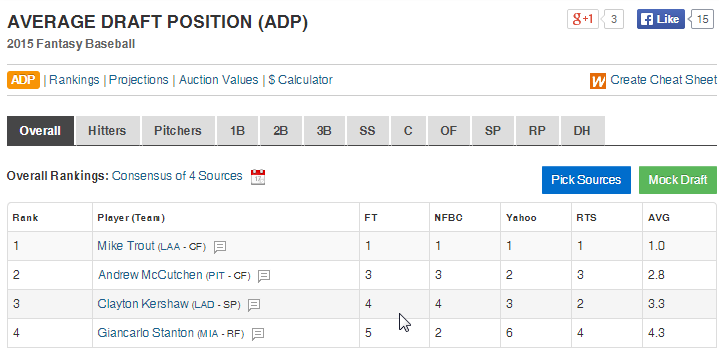
We will use a powerful feature of Excel called web querying to pull in the ADP information aggregated by FantasyPros.com (please note, I’m an affiliate of Fantasy Pros). The web query will suck up that table of ADP information and bring it directly into Excel for us to then VLOOKUP into our existing “Hitter Ranks” and “Pitcher Ranks” tabs.

Fantasy Pros has the best ADP information I've found on the web. They have the most sources in one place and it appears to be updated regularly.
Fantasy Pros has the best ADP information I’ve found on the web. They have the most sources in one place and it appears to be updated regularly.

Assumptions

I am assuming that you’ve followed my Standings Gain Points or Points-League Ranking series and are already starting with a spreadsheet that is based off one of those (you don’t have to have those exact spreadsheets, but something similar).

Excel Functions and Concepts Used in this Post

Web Query

As you can probably imagine, the power of the web query is that it automatically updates the data in your Excel file without you having to do ANYTHING after the initial setup.

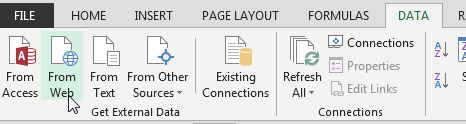
Web queries are created from the “Data” tab on the Excel Ribbon, under the “Get External Data” icon grouping. There are several ways to get data from outside sources into Excel, we will be using the “From Web” button.

GET_EXTERNAL_DATA

One “weakness” I have found in web queries is that they cannot work with “tables” in Excel. You cannot pull a web query in as the data of a table. If you’re a big follower of this site you know that’s a bit of an issue for me because I use tables all the time. Thankfully this doesn’t prevent us from doing things, I just point it out because you might wonder why I set things up the way I do in the instructions below.

Find

The FIND function searches within a specified cell for a string of text that you provide. If the FIND function locates the string, it will return the character position where the string starts at.

I know, you’re thinking “What the heck does that even mean?”. Here’s an example. Let’s say we have the text “Mike Trout (LAA)” in a cell and every player in our whole spreadsheet follows that format. If we want to pull out each player’s team we will need to start by figuring out where the team name starts in that cell. And we can’t just say it will always start at the 13th character each time when we have players like this hanging around MLB.

Instead we can use the FIND formula to intelligently determine where that opening parenthesis is for each player (it starts at 12 for Trout and 23 for Salty).

This formula requires two inputs:

FIND(Find_text, Within_text)

FIND

  1. Find_text – This is the string of text you are searching for and keep in mind it is case-sensitive. You would wrap the string you are searching for in quotation marks. So in our example above, to look for the opening parenthesis you would enter “(” here. Or if you’re trying to be slightly more precise, you could enter ” (“, a space before the parenthesis.

  2. Within_text – This is the text you want to search WITHIN. This can be a cell number.

Left

The LEFT function gives you the leftmost number of characters in a text string. You also get to specify the number of characters to specify.

For example, if you have a text string of “Mike Trout (LAA)” and you ask for the 10 leftmost characters in that string, you would get “Mike Trout” back.

This formula requires two inputs:

LEFT(Text, Num_chars)

LEFT_FUNCTION

  1. Text – This is the text string you want the leftmost characters from.
  2. Num_chars – This is the number of characters you want from the string. This can be a hard entered number (e.g. 10) or it can be a formula itself that results in a number.

Combining Functions Together

We can do something pretty powerful by combining the FIND and LEFT functions together. I’ve been hinting at it with this “Mike Trout (LAA)” example. Recall from above that the LEFT function wants to know our text string (“Mike Trout (LAA)”) and the number of characters on the left to pull from that string.

Assume that cell B2 has a value of “Mike Trout (LAA)”. Instead of using this formula:

LEFT(B2, 10)

We can use this:

LEFT(B2, FIND(" (",B2)-1)

The FIND(" (",B2)-1 part of the formula returns a 10 (if you don’t subtract the one it returns an 11), and “Mike Trout” has 10 characters in it (including the space). By using this combination of functions we don’t have to type in a “10” for Mike Trout and a “21” for Saltalamacchia.

Important Prerequisite

Before you’re able to proceed with the instructions below you must make sure the PLAYERIDMAP in the file you’re working with was updated after February 21st, 2015. I added a column to the Player ID Map called “FANTPROSNAME” that is necessary for the steps below to work.

Instructions for updating your PLAYERIDMAP can be found here. Completing the update should only take five minutes or so.

Step-by-Step Instructions

Continue reading “How to Add Average Draft Position Info to Your Spreadsheet”